
 Systems42 Dashboard
: the mark
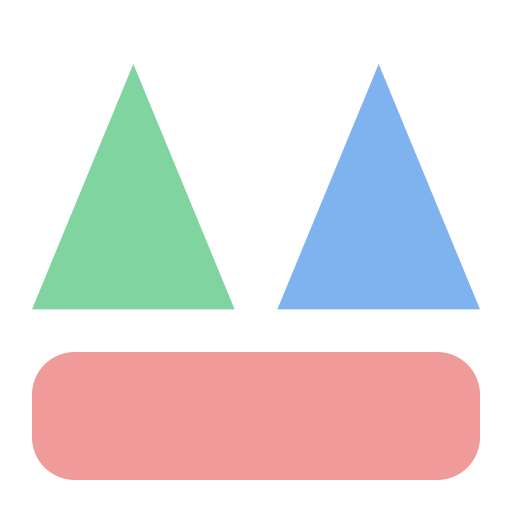
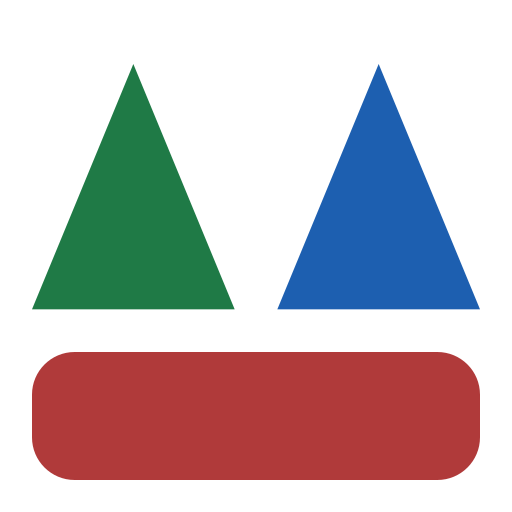
The idea: the home page as a picture. Requirements and Architecture are two peaks, Commons is the ground they stand on, and the valley between is where the status and open issues sit.
Grid: 48 × 48, margin 3, gap 4, ground radius 4.
| Part | Token | Dark | Light | Shape |
|---|---|---|---|---|
| Requirements peak | --area-req |
#7fd4a0 |
#1f7a46 |
triangle (3,29) (12.5,6) (22,29) |
| Architecture peak | --area-arc |
#7fb3f0 |
#1d5fb0 |
triangle (26,29) (35.5,6) (45,29) |
| Commons ground | --area-org |
#f09a9a |
#b03a3a |
rect x3 y33, 42 × 12, radius 4 |
Rules: smallest size 16 px; keep about 5 units of clear space; no text, outlines, gradients or shadows; do not recolour, reorder, stretch or rotate.
Intro: the ground grows, then the two peaks rise, then a fade; about 2 s, once per tab, skipped under reduced motion, any click or key ends it.
Files: the dashboard's example brand systems42,
_system/apps/dashboard/brands/systems42/, holds mark-dark.svg,
mark-light.svg, favicon.svg and the intro, intro.html. This folder holds
the PNGs (mark-dark.png, mark-light.png, favicon.png).